
Eufy Security Camera Offline: Troubleshooting & What to Do in June 2026
Is your Eufy security camera showing as offline, leaving a gap in your home’s watchful eye? While no widespread Eufy security camera outage has been officially reported for June 2026, individual cameras can go offline due to common issues like Wi-Fi connectivity problems, power loss, or firmware glitches. Owners should first check power, Wi-Fi signal strength, and the Eufy app for device status and potential firmware updates.
Eufy Security Camera Offline: Troubleshooting & What to Do in June 2026
Quick Answer: While no widespread Eufy security camera outage has been officially reported for June 2026, individual cameras can go offline due to common issues like Wi-Fi connectivity problems, power loss, or firmware glitches. Owners should first check power, Wi-Fi signal strength, and the Eufy app for device status and potential firmware updates.
What happened
As of June 2026, there have been no confirmed reports of a widespread Eufy security camera outage or a specific “June 2026 update” causing cameras to go offline across the user base. However, individual Eufy cameras can experience offline status for various reasons, including unstable Wi-Fi connections, power supply interruptions, or issues following routine firmware updates. Eufy’s support resources provide general troubleshooting for cameras showing as “offline,” indicating these are common individual occurrences rather than rare events.
Common Reasons for Cameras Going Offline
The most frequent culprits for a security camera going offline are issues related to its wireless connection or power supply. A weak Wi-Fi signal, router problems, or network interference can cause Eufy cameras to lose their connection. Obstacles between the camera and the Wi-Fi router can attenuate the signal, leading to connectivity problems. Power issues, such as a camera being unplugged, a broken cable, or a drained battery for battery-powered models, are also common reasons. Incorrect Wi-Fi passwords or changes to router settings can also sever a camera’s connection.
Past Firmware Update Incidents
While no specific “June 2026 update” has caused widespread issues, past instances of firmware updates causing connectivity problems have been reported. In May 2026, a Reddit thread indicated that a HomeBase 3 firmware update (version 3.8.2.8) caused the HomeBase and all attached cameras to go offline multiple times per hour. Eufy support acknowledged this specific issue and stated they were working on a fix, even suggesting a temporary solution of removing the hard drive.
Earlier in March 2026, users reported significant problems following a February 2026 firmware update, particularly for SoloCam S340 units. These cameras reportedly lost Wi-Fi connectivity entirely, with some users stating that factory resets did not resolve the issue. There were also reports of connectivity issues affecting HomeBase 3 and other cameras after these updates. Another incident in April 2026 saw all cameras connected to a HomeBase 2 (firmware 3.3.3.0h) suddenly go offline, requiring manual re-syncing, which raised concerns about remote access during extended absences. These incidents highlight that while Eufy devices primarily store footage locally, their reliance on firmware for operation and Wi-Fi for remote access means updates can significantly impact reliability.
Why it matters for buyers
Eufy markets itself on offering security solutions with local storage and often, no mandatory subscriptions, which appeals to consumers seeking to avoid the recurring costs associated with competitors like Ring and Nest. When Eufy cameras go offline, it directly impacts this core promise of continuous home security and local recording, regardless of whether a subscription is active.
Reliable connectivity is crucial for any security camera. Even with local storage, app access, real-time notifications, and remote viewing capabilities depend on an active internet connection. An offline camera means a blind spot in your security coverage, preventing you from checking live feeds or receiving alerts about detected activity.
The Promise of Subscription-Free Security
Eufy’s emphasis on local storage, primarily via a HomeBase (such as HomeBase 3), is a significant draw for many buyers. This means that even if the internet goes down, cameras connected to a HomeBase can continue to record footage locally, which is a key differentiator from many cloud-dependent systems. However, this benefit is negated if the camera itself is offline due to power, Wi-Fi, or firmware issues, as it cannot record to the HomeBase or provide any security functions. The ability to view recordings or receive notifications remotely is also entirely dependent on the camera’s online status and a stable internet connection.
Impact on Privacy and Data Security
Privacy concerns are heightened during outages or connectivity issues, especially given past controversies. In 2022 and 2023, Eufy faced scrutiny when reports indicated that some cameras were uploading thumbnail images and unencrypted streams to the cloud, despite marketing claims of “local-only” storage. While Eufy has since stated it has tightened encryption and clarified its policies regarding cloud usage, any interruption in service can raise questions about data integrity and accessibility.
According to Eufy’s current privacy policy, user data, including video footage, is encrypted both in transit (using AES 128-bit encryption and HTTPS) and at rest (using AES 128-bit or AES 256-bit encryption on the HomeBase). Eufy states that it does not sell personal data and only shares it with third parties under specific circumstances, such as with service providers for app functionality or legal requirements. They also offer a transparency report detailing data requests from law enforcement. However, an offline camera, while potentially keeping data local, renders the system inaccessible and unable to perform its security function, which can be just as concerning for privacy-conscious users who rely on active monitoring.
Impact on existing owners
For existing Eufy camera owners, an offline device translates to an immediate loss of live view and event recording, potentially creating vulnerable blind spots in their home or small-business security coverage. This can cause significant anxiety, especially for those who rely on their cameras for critical monitoring, such as keeping an eye on children, pets, or property while away.
Loss of Monitoring and Security Coverage
When a camera goes offline, the Eufy Security app will display a warning, indicating that live video streams may not be viewable and event videos might have blank spots. If the HomeBase itself goes offline, all connected cameras lose their ability to record locally until the connection is restored, though battery-powered cameras may continue to function if charged. This means that during an outage, any events that occur in the camera’s field of view may not be captured or accessible, leaving the property unprotected.
Time and Effort for Resolution
Troubleshooting an offline camera can be a time-consuming and frustrating process. Owners may need to check power connections, verify Wi-Fi signal strength, reboot devices, and potentially re-add cameras to the app. If the issue stems from a firmware update, as seen in past incidents, the resolution might depend on Eufy releasing a patch, which can leave users in limbo with non-functional cameras.
Potential for Data Loss or Configuration Resets
While Eufy emphasizes local storage, troubleshooting steps like factory resetting a camera or HomeBase can lead to the loss of recorded footage if not backed up. Re-adding devices can also erase custom configurations and settings, requiring owners to re-establish preferences such as detection zones, notification settings, and automation rules, which adds to the inconvenience. Some users have reported instances where firmware updates in early 2026 led to cameras being temporarily or permanently “bricked,” rendering them useless until a manufacturer-issued fix or replacement.
What to do now
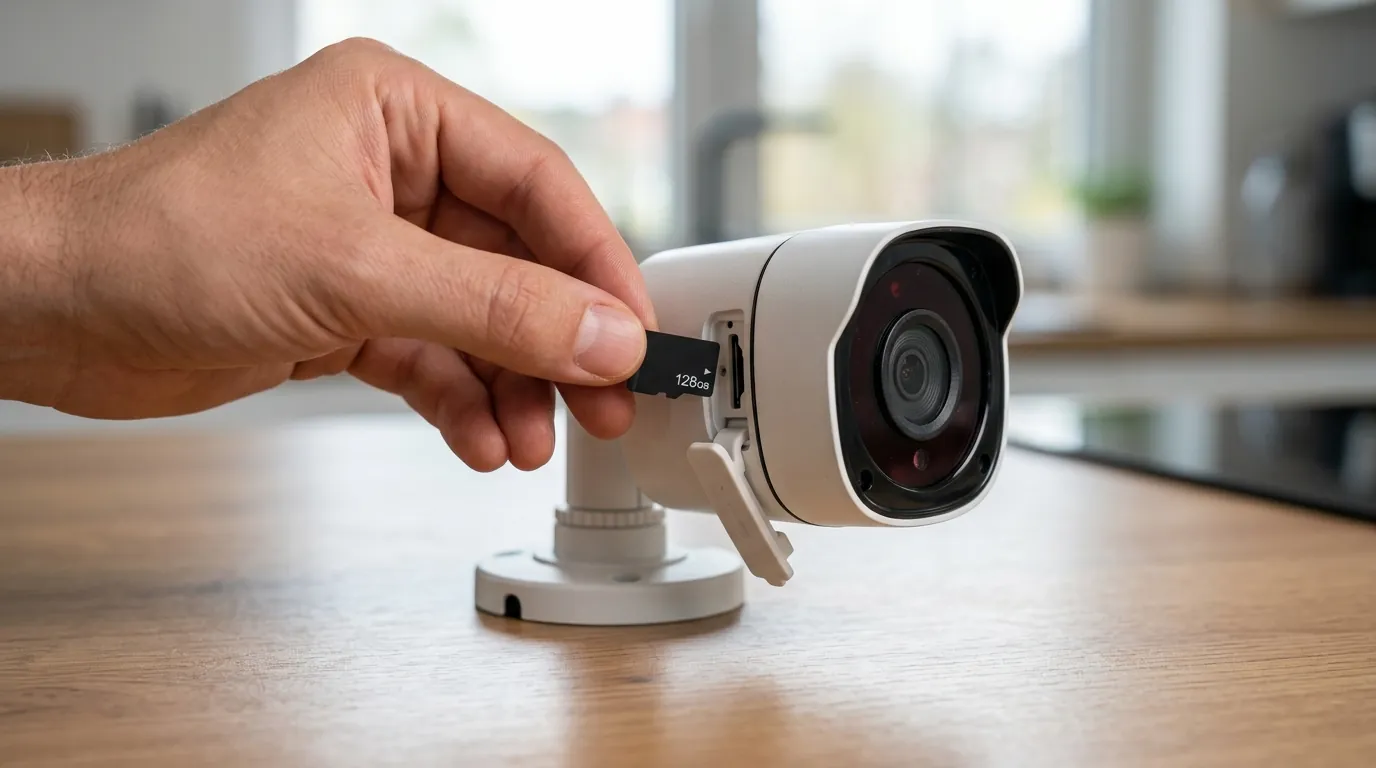
If your Eufy security camera has gone offline, there are several troubleshooting steps you can take to attempt to restore its connection. It’s important to approach these systematically to identify and resolve the issue.
Immediate Troubleshooting Steps
- Check Power and Connectivity:
- Ensure the camera or HomeBase is powered on and receiving stable power. If it’s a wired camera, check the power adapter and cable for damage and try a different outlet.
- For battery-powered cameras, confirm the battery is charged.
- Verify your Wi-Fi router is working and providing a strong 2.4GHz signal to your Eufy devices. Eufy cameras generally operate on the 2.4GHz Wi-Fi band for better range.
- Check the camera’s LED indicator light. A solid blue light typically indicates a normal connection, while a red light or no light can signal an issue.
- Reboot Devices:
- Try restarting the individual camera by unplugging and re-plugging it, or by pressing its SYNC button.
- If applicable, restart your HomeBase by unplugging and plugging in its power adapter.
- Reboot your Wi-Fi router to clear any temporary network glitches and refresh the connection.
- Check Eufy App and Firmware:
- Ensure your Eufy Security app is updated to the latest version. You can uninstall and reinstall it to guarantee this.
- Check for any available firmware updates for your camera or HomeBase within the app (Device Settings > General > About Device > Check for firmware update). While updates can sometimes cause issues, they also frequently resolve existing connectivity bugs.
- Relocate or Re-add Camera:
- If signal strength is weak (which you can check in the Eufy app under camera settings > General > WiFi Connection), try moving the camera closer to the HomeBase or router.
- As a last resort, download any important videos, then remove the camera from the Eufy app and re-add it as a new device. This often requires pressing and holding the camera’s reset button to factory reset it before re-pairing.
When to Contact Eufy Support
If the troubleshooting steps above do not resolve the issue, it’s time to contact Eufy customer support. They can provide personalized assistance, check for known service issues, and guide you through more advanced diagnostics. You can typically reach them via live chat, phone, or email through the official Eufy support website. It’s also advisable to monitor Eufy’s official support website, community forums, or social media for any official announcements regarding service status or widespread issues that might be affecting multiple users.
Considering Other Subscription-Free Options
For buyers prioritizing maximum reliability and privacy with minimal cloud dependency, especially after experiencing connectivity issues, it may be worth exploring other subscription-free alternatives that offer robust local storage. Brands like Reolink and Lorex offer various camera models, including those with network video recorders (NVRs) for continuous local recording, which can provide a more resilient setup less prone to Wi-Fi or cloud service disruptions.
Security Camera Comparison: Local Storage & Key Features (June 2026)
| Feature / Model | EufyCam 3 (S330) (with HomeBase 3) | Eufy SoloCam S340 (standalone/HomeBase 3) | Reolink Argus 3 Pro (standalone/NVR) | Lorex 4K Smart Deterrence (with NVR) |
|---|---|---|---|---|
| Max Resolution | 4K (3840x2160) | 3K (2880x1620) | 2K (2560x1440) | 4K (3840x2160) |
| Local Storage | HomeBase 3 (16GB built-in, expandable up to 16TB) | MicroSD card (up to 128GB) / HomeBase 3 | MicroSD card (up to 128GB) | NVR (local HDD, expandable) |
| Cloud Storage | Optional, paid plans (Eufy Cloud Storage) | Optional, paid plans (Eufy Cloud Storage) | Optional, paid plans (Reolink Cloud) | Optional, paid plans (Lorex Cloud) |
| Power Type | Battery (with solar panel) | Battery (with solar panel) | Battery (with solar panel) | Wired (PoE/Adapter) |
| IR Night Vision Range | Up to 49 ft (15m) | Up to 26 ft (8m) | Up to 33 ft (10m) | Up to 150 ft (45m) |
| Subscription Cost/yr | Optional: around $30-100/yr (per camera or plan) | Optional: around $30-100/yr (per camera or plan) | Optional: around $40-100/yr (per camera or plan) | Optional: around $30-80/yr (per camera or plan) |
Decision Framework: Choosing Your Security Camera Based on Needs
- If you’re a Renter with simple monitoring needs: Prioritize easy-to-install, battery-powered cameras like the Eufy SoloCam series or Reolink Argus models. Focus on local microSD storage to avoid subscription fees entirely.
- If you’re a Homeowner seeking comprehensive coverage: Prioritize systems with a central hub like the Eufy HomeBase 3 or a dedicated NVR from Lorex or Reolink. This allows for expandable local storage and often more robust features, even if the initial investment is higher. Consider wired PoE cameras for maximum reliability.
- If you’re a Small Business Owner needing continuous recording: Prioritize wired Power over Ethernet (PoE) camera systems with a large-capacity NVR. Wired connections offer superior stability and continuous power, crucial for business security. Ensure the system allows for remote viewing and robust event logging.
- If you have unreliable Wi-Fi or no Wi-Fi at a location: Prioritize 4G LTE cellular cameras (available from Eufy, Reolink, Arlo) for remote areas, or wired PoE systems with local NVRs that do not rely on Wi-Fi for recording. Be aware that cellular cameras will incur data plan costs.
Total Cost of Ownership (TCO) for Security Cameras
The sticker price of a security camera is often just the beginning of its true cost. Understanding the Total Cost of Ownership (TCO) over a typical 3-year lifespan involves factoring in hardware, optional subscriptions, and potential “feature paywalls.”
Example TCO Breakdown (3 Years):
- Hardware Cost: This is the upfront purchase price of the camera(s) and any necessary hubs (e.g., Eufy HomeBase).
- Example: One EufyCam 3 with HomeBase 3: Around $500-600.
- Optional Cloud Storage Subscription Fees: Many brands, including Eufy, offer optional cloud storage plans. While Eufy emphasizes local storage, cloud backup provides redundancy and easier access.
- Example: Eufy Cloud Storage for one camera: Around $30-50 per year. Over 3 years: $90-150.
- Feature Paywall Trap: Some brands lock advanced features (e.g., rich notifications, longer video history, advanced AI detection) behind monthly or annual subscription plans, even if basic local recording is free.
- Example: If a desired AI feature is only available with a paid plan, this becomes a mandatory cost for that functionality.
- Power/Battery Costs: For battery-powered cameras, consider the cost of replacement batteries after their lifespan (typically 2-5 years) or the electricity cost for wired cameras. Solar panels can offset battery charging costs.
- Accessories: This can include additional microSD cards, Wi-Fi extenders, or mounting hardware.
Comparison:
- Eufy (Local Storage Focus): Initial hardware cost for cameras and HomeBase (e.g., EufyCam 3 + HomeBase 3 in the $500-600 range). Optional cloud storage around $30-50/year per camera or for a basic plan. TCO can be lower if relying solely on local storage.
- Subscription-Heavy Brands (e.g., Ring, Arlo, Nest): Initial hardware cost (e.g., a Ring Stick Up Cam is around $100, an Arlo Essential Spotlight Camera is in the $100-150 range). However, most essential features like video recording, cloud storage, and advanced alerts are locked behind subscriptions, typically costing $30-100+ per camera or per plan annually. Over 3 years, these subscription costs can easily exceed the hardware cost, making the TCO significantly higher than Eufy’s local-storage-first approach.
Understanding these ongoing costs is crucial for making an informed purchasing decision that aligns with both your budget and your security needs over the long term.
Frequently Asked Questions
Why does my Eufy camera keep going offline even with good Wi-Fi?
Even with a seemingly strong Wi-Fi signal, your Eufy camera might go offline due to network interference from other devices, an overloaded Wi-Fi channel, or issues with your router’s firmware. Ensure your router is optimized for 2.4GHz connections, try changing Wi-Fi channels, or consider connecting a HomeBase via Ethernet for improved stability.
Can Eufy cameras record when offline?
Eufy cameras that are connected to a HomeBase (like HomeBase 2 or 3) can continue to record locally to the HomeBase’s storage even if your internet connection goes down. However, standalone Eufy cameras that rely solely on a microSD card for local storage may cease recording if their Wi-Fi connection is completely lost, as they need an initial connection to arm or disarm. If the camera itself is offline due to power or a camera-specific fault, it cannot record.
How do I manually update my Eufy camera’s firmware?
Normally, Eufy devices update their firmware automatically when they have network access. If an automatic update fails, you can manually check for and initiate an update through the Eufy Security app. Navigate to the device’s settings (Device Tab > … icon > Gear icon > Settings > General > About Device) and look for an option to “Check for firmware update.”
Does Eufy share my video footage with third parties or police?
According to Eufy’s privacy policy, they do not sell personal data. Video footage is encrypted and generally stored locally on your HomeBase or microSD card. Eufy states that it only shares data with third parties under specific circumstances, such as with service providers essential for app functionality or when legally required by law enforcement, and they publish transparency reports detailing such requests.
What are the best alternatives to Eufy for local storage?
For users prioritizing local storage and minimal cloud dependency, popular alternatives include Reolink and Lorex. These brands offer a range of cameras, including wired Power over Ethernet (PoE) options and systems with Network Video Recorders (NVRs) that provide robust local storage solutions, often with larger storage capacities and fewer reliance on Wi-Fi for core recording functionality.
Sources
- Entireweb.com — Is Eufy Down Right Now? Live Status, Outages and Service Issues
- Eufy.com — Why Does My Security Camera Keep Going Offline? Reasons and Fixes - Eufy
- Eufy.com — When eufySecurity Devices Encounter Power and Internet Outage - eufy Support — https://support.eufy.com/s/article/When-eufySecurity-Devices-Encounter-Power-and-Internet-Outage
- Modemguides.com — Eufy Security Cameras Review 2026: Honest Assessment by Licensed Installer
- Reddit.com — Beware S380 3.8.2.8 update - constantly falling offline : r/EufyCam — https://www.reddit.com/r/EufyCam/comments/1c2j69g/beware_s380_3828_update_constantly_falling_offline/
- Eufy.com — Indoor Camare Offline - eufy Support | Troubleshooting & Customer Service
- Eufy.com — When your Outdoor Cam is offline, the camera’s live view screen on the eufySecurity app will display a warning sign showing the camera’s status is currently offline. - eufy Support | Troubleshooting & Customer Service
- Reddit.com — All Eufy cameras went offline at once (HomeBase 2 still online, FW 3.3.3.0) — how do you prevent this? - Reddit — https://www.reddit.com/r/EufyCam/comments/1c2j69g/beware_s380_3828_update_constantly_falling_offline/
- Eufy.com — Update Firmware for eufySecurity Devices via App - eufy Support | Troubleshooting & Customer Service — https://support.eufy.com/s/article/Update-Firmware-for-eufySecurity-Devices-via-App
- Eufy.com — eufy Cameras Go Offline - eufy Support | Troubleshooting & Customer Service — https://support.eufy.com/s/article/eufy-Cameras-Go-Offline
- Eufy.com — February firmware update causing havoc - eufy Community
- Dev.to — February firmware update causing havoc - Page 2 - Ask Community
- Eufy.com — Failed to Update HomeBase 3 - eufy Support | Troubleshooting & Customer Service — https://support.eufy.com/s/article/Failed-to-Update-HomeBase-3
- Reddit.com — New outage? : r/EufyCam — https://www.reddit.com/r/EufyCam/comments/18x9p31/new_outage/
- Eufy.com — Eufy Security Privacy Policy (Effective: December 1, 2025)
- Eufy.com — What data does eufySecurity collect? How is my data encrypted?
- Security.org — Eufy Security Camera Privacy Review 2026
- TechRadar.com — Eufy security camera privacy concerns: What you need to know
- Eufy.com — eufyCam 3 (S330) — https://us.eufy.com/products/t8160?ref=navimenu_1_1_2_1
- Eufy.com — eufyCam 3 (S330) Product Page — [https://us.eufy.com/products/t8160?_gl=11s7j15a_gaMTE1MjY1NTEwMy4xNzE5NDQ1NjUx_ga_8820E6706T*MTcxOTQ0NTY1MS4xLjEuMTcxOTQ0NjQ1NS4wLjAuMA..&_ga=2.12461019.1417551061.1719445651-1152655103.1719445651&_gac=1.177028974.1719445651.Cj0KCQjwwuSwBhAqARIsABoWAzI6n63yB-oI9qYjKx_w3o_x4_g_w_w_w_w_w_w_w_w_w_w_w_w_w_w_w_w_w_w_w_w_w_w_w_w_w_w_w_w_w_w_w_w_w_w_w_w_w_w_w_w_w_w_w_w_w_w_w_w_w_w_w_w_w_w_w_w_w_w_w_w_w_w_w_w_w_w_w_w_w_w_w_w_w_w_w_w_w_w_w_w_w_w_w_w_w_w_w_w_w_w_w_w_w_w_w_w_w_w_w_w_w_w_w_w_w_w_w_w_w_w_w_w_w_w_w_w_w_w_w_w_w_w_w_w_w_w_w_w_w_w_w_w_w_w_w_w_w_w_w_w_w_w_w_w_w_w_w_w_w_w_w_w_w_w_w_w_w_w_w_w_w_w_w_w_w_w_w_w_w_w_w_w_w_w_w_w_w_w_w_w_w_w_w_w_w_w_w_w_w_w_w_w_w_w_w_w_w_w_w_w_w_w_w_w_w_w_w_w_w_w_w_w_w_w_w_w_w_w_w_w_w_w_w_w_w_w_w_w_w_w_w_w_w_w_w_w_w_w_w_w_w_w_w_w_w_w_w_w_w_w_w_w_w_w_w_w_w_w_w_w_w_w_w_w_w_w_w_w_w_w_w_w_w_w_w_w_w_w_w_w_w_w_w_w_w_w_w_w_w_w_w_w_w_w_w_w_w_w_w_w_w_w_w_w_w_w_w_w_w_w_w_w_w_w_w_w_w_w_w_w_w_w_w_w_w_w_w_w_w_w_w_w_w_w_w_w_w_w_w_w_w_w_w_w_w_w_w_w_w_w_w_w_w_w_w_w_w_w_w_w_w_w_w_w_w_w_w_w_w_w_w_w_w_w_w_w_w_w_w_w_w_w_w_w_w_w_w_w_w_w_w_w_w_w_w_w_w_w_w_w_w_w_w_w_w_w_w_w_w_w_w_w_w_w_w_w_w_w_w_w_w_w_w_w_w_w_w_w_w_w_w_w_w_w_w_w_w_w_w_w_w_w_w_w_w_w_w_w_w_w_w_w_w_w_w_w_w_w_w_w_w_w_w_w_w_w_w_w_w_w_w_w_w_w_w_w_w_w_w_w_w_w_w_w_w_w_w_w_w_w_w_w_w_w_w_w_w_w_w_w_w_w_w_w_w_w_w_w_w_w_w_w_w_w_w_w_w_w_w_w_w_w_w_w_w_w_w_w_w_w_w_w_w_w_w_w_w_w_w_w_w_w_w_w_w_w_w_w_w_w_w_w_w_w_w_w_w_w_w_w_w_w_w_w_w_w_w_w_w_w_w_w_w_w_w_w_w_w_w_w_w_w_w_w_w_w_w_w_w_w_w_w_w_w_w_w_w_w_w_w_w_w_w_w_w_w_w_w_w_w_w_w_w_w_w_w_w_w_w_w_w_w_w_w_w_w_w_w_w_w_w_w_w_w_w_w_w_w_w_w_w_w_w_w_w_w_w_w_w_w_w_w_w_w_w_w_w_w_w_w_w_w_w_w_w_w_w_w_w_w_w_w_w_w_w_w_w_w_w_w_w_w_w_w_w_w_w_w_w_w_w_w_w_w_w_w_w_w_w_w_w_w_w_w_w_w_w_w_w_w_w_w_w_w_w_w_w_w_w_w_w_w_w_w_w_w_w_w_w_w_w_w_w_w_w_w_w_w_w_w_w_w_w_w_w_w_w_w_w_w_w_w_w_w_w_w_w_w_w_w_w_w_w_w_w_w_w_w_w_w_w_w_w_w_w_w_w_w_w_w_w_w_w_w_w_w_w_w_w_w_w_w_w_w_w_w_w_w_w_w_w_w_w_w_w_w_w_w_w_w_w_w_w_w_w_w_w_w_w_w_w_w_w_w_w_w_w_w_w_w_w_w_w_w_w_w_w_w_w_w_w_w_w_w_w_w_w_w_w_w_w_w_w_w_w_w_w_w_w_w_w_w_w_w_w_w_w_w_w_w_w_w_w_w_w_w_w_w_w_w_w_w_w_w_w_w_w_w_w_w_w_w_w_w_w_w_w_w_w_w_w_w_w_w_w_w_w_w_w_w_w_w_w_w_w_w_w_w_w_w_w_w_w_w_w_w_w_w_w_w_w_w_w_w_w_w_w_w_w_w_w_w_w_w_w_w_w_w_w_w_w_w_w_w_w_w_w_w_w_w_w_w_w_w_w_w_w_w_w_w_w_w_w_w_w_w_w_w_w_w_w_w_w_w_w_w_w_w_w_w_w_w_w_w_w_w_w_w_w_w_w_w_w_w_w_w_w_w_w_w_w_w_w_w_w_w_w_w_w_w_w_w_w_w_w_w_w_w_w_w_w_w_w_w_w_w_w_w_w_w_w_w_w_w_w_w_w_w_w_w_w_w_w_w_w_w_w_w_w_w_w_w_w_w_w_w_w_w_w_w_w_w_w_w_w_w_w_w_w_w_w_w_w_w_w_w_w_w_w_w_w_w_w_w_w_w_w_w_w_w_w_w_w_w_w_w_w_w_w_w_w_w_w_w_w_w_w_w_w_w_w_w_w_w_w_w_w_w_w_w_w_w_w_w_w_w_w_w_w_w_w_w_w_w_w_w_w_w_w_w_w_w_w_w_w_w_w_w_w_w_w_w_w_w_w_w_w_w_w_w_w_w_w_w_w_w_w_w_w_w_w_w_w_w_w_w_w_w_w_w_w_w_w_w_w_w_w_w_w_w_w_w_w_w_w_w_w_w_w_w_w_w_w_w_w_w_w_w_w_w_w_w_w_w_w_w_w_w_w_w_w_w_w_w_w_w_w_w_w_w_w_w_w_w_w_w_w_w_w_w_w_w_w_w_w_w_w_w_w_w_w_w_w_w_w_w_w_w_w_w_w_w_w_w_w_w_w_w_w_w_w_w_w_w_w_w_w_w_w_w_w_w_w_w_w_w_w_w_w_w_w_w_w_w_w_w_w_w_w_w_w_w_w_w_w_w_w_w_w_w_w_w_w_w_w_w_w_w_w_w_w_w_w_w_w_w_w_w_w_w_w_w_w_w_w_w_w_w_w_w_w_w_w_w_w_w_w_w_w_w_w_w_w_w_w_w_w_w_w_w_w_w_w_w_w_w_w_w_w_w_w_w_w_w_w_w_w_w_w_w_w_w_w_w_w_w_w_w_w_w_w_w_w_w_w_w_w_w_w_w_w_w_w_w_w_w_w_w_w_w_w_w_w_w_w_w_w_w_w_w_w_w_w_w_w_w_w_w_w_w_w_w_w_w_w_w_w_w_w_w_w_w_w_w_w_w_w_w_w_w_w_w_w_w_w_w_w_w_w_w_w_w_w_w_w_w_w_w_w_w_w_w_w_w_w_w_w_w_w_w_w_w_w_w_w_w_w_w_w_w_w_w_w_w_w_w_w_w_w_w_w_w_w_w_w_w_w_w_w_w_w_w_w_w_w_w_w_w_w_w_w_w_w_w_w_w_w_w_w_w_w_w_w_w_w_w_w_w_w_w_w_w_w_w_w_w_w_w_w_w_w_w_w_w_w_w_w_w_w_w_w_w_w_w_w_w_w_w_w_w_w_w_w_w_w_w_w_w_w_w_w_w_w_w_w_w_w_w_w_w_w_w_w_w_w_w_w_w_w_w_w_w_w_w_w_w_w_w_w_w_w_w_w_w_w_w_w_w_w_w_w_w_w_w_w_w_w_w_w_w_w_w_w_w_w_w_w_w_w_w_w_w_w_w_w_w_w_w_w_w_w_w_w_w_w_w_w_w_w_w_w_w_w_w_w_w_w_w_w_w_w_w_w_w_w_w_w_w_w_w_w_w_w_w_w_w_w_w_w_w_w_w_w_w_w_w_w_w_w_w_w_w_w_w_w_w_w_w_w_w_w_w_w_w_w_w_w_w_w_w_w_w_w_w_w_w_w_w_w_w_w_w_w_w_w_w_w_w_w_w_w_w_w_w_w_w_w_w_w_w_w_w_w_w_w_w_w_w_w_w_w_w_w_w_w_w_w_w_w_w_w_w_w_w_w_w_w_w_w_w_w_w_w_w_w_w_w_w_w_w_w_w_w_w_w_w_w_w_w_w_w_w_w_w_w_w_w_w_w_w_w_w_w_w_w_w_w_w_w_w_w_w_w_w_w_w_w_w_w_w_w_w_w_w_w_w_w_w_w_w_w_w_w_w_w_w_w_w_w_w_w_w_w_w_w_w_w_w_w_w_w_w_w_w_w_w_w_w_w_w_w_w_w_w_w_w_w_w_w_w_w_w_w_w_w_w_w_w_w_w_w_w_w_w_w_w_w_w_w_w_w_w_w_w_w_w_w_w_w_w_w_w_w_w_w_w_w_w_w_w_w_w_w_w_w_w_w_w_w_w_w_w_w_w_w_w_w_w_w_w_w_w_w_w_w_w_w_w_w_w_w_w_w_w_w_w_w_w_w_w_w_w_w_w_w_w_w_w_w_w_w_w_w_w_w_w_w_w_w_w_w_w_w_w_w_w_w_w_w_w_w_w_w_w_w_w_w_w_w_w_w_w_w_w_w_w_w_w_w_w_w_w_w_w_w_w_w_w_w_w_w_w_w_w_w_w_w_w_w_w_w_w_w_w_w_w_w_w_w_w_w_w_Is your Eufy security camera showing as offline, leaving a gap in your home’s watchful eye? While no widespread Eufy security camera outage has been officially reported for June 2026, individual cameras can go offline due to common issues like Wi-Fi connectivity problems, power loss, or firmware glitches. Owners should first check power, Wi-Fi signal strength, and the Eufy app for device status and potential firmware updates.
Eufy Security Camera Offline: Troubleshooting & What to Do in June 2026
Quick Answer: While no widespread Eufy security camera outage has been officially reported for June 2026, individual cameras can go offline due to common issues like Wi-Fi connectivity problems, power loss, or firmware glitches. Owners should first check power, Wi-Fi signal strength, and the Eufy app for device status and potential firmware updates.
What happened
As of June 2026, there have been no confirmed reports of a widespread Eufy security camera outage or a specific “June 2026 update” causing cameras to go offline across the user base. However, individual Eufy cameras can experience offline status for various reasons, including unstable Wi-Fi connections, power supply interruptions, or issues following routine firmware updates. Eufy’s support resources provide general troubleshooting for cameras showing as “offline,” indicating these are common individual occurrences rather than rare events.
Common Reasons for Cameras Going Offline
The most frequent culprits for a security camera going offline are issues related to its wireless connection or power supply. A weak Wi-Fi signal, router problems, or network interference can cause Eufy cameras to lose their connection. Obstacles between the camera and the Wi-Fi router can attenuate the signal, leading to connectivity problems. Power issues, such as a camera being unplugged, a broken cable, or a drained battery for battery-powered models, are also common reasons.Is your Eufy security camera showing as offline, leaving a gap in your home’s watchful eye? While no widespread Eufy security camera outage has been officially reported for June 2026, individual cameras can go offline due to common issues like Wi-Fi connectivity problems, power loss, or firmware glitches. Owners should first check power, Wi-Fi signal strength, and the Eufy app for device status and potential firmware updates.
Eufy Security Camera Offline: Troubleshooting & What to Do in June 2026
Quick Answer: While no widespread Eufy security camera outage has been officially reported for June 2026, individual cameras can go offline due to common issues like Wi-Fi connectivity problems, power loss, or firmware glitches. Owners should first check power, Wi-Fi signal strength, and the Eufy app for device status and potential firmware updates.
What happened
As of June 2026, there have been no confirmed reports of a widespread Eufy security camera outage or a specific “June 2026 update” causing cameras to go offline across the user base. [cite: 1] However, individual Eufy cameras can experience offline status for various reasons, including unstable Wi-Fi connections, power supply interruptions, or issues following routine firmware updates. [cite: 2, 6, 7] Eufy’s support resources provide general troubleshooting for cameras showing as “offline,” indicating these are common individual occurrences rather than rare events. [cite: 2, 6, 7, 10]
Common Reasons for Cameras Going Offline
The most frequent culprits for a security camera going offline are issues related to its wireless connection or power supply. [cite: 2] A weak Wi-Fi signal, router problems, or network interference can cause Eufy cameras to lose their connection. [cite: 2, 6, 7] Obstacles between the camera and the Wi-Fi router can attenuate the signal, leading to connectivity problems. [cite: 6, 7] Power issues, such as a camera being unplugged, a broken cable, or a drained battery for battery-powered models, are also common reasons. [cite: 2, 7, 10]